 TechAppForce
Low-code without a developer dead end.
Configure the common application plumbing, and write real code where your product needs something unique. Four seams, each with a clear contract.
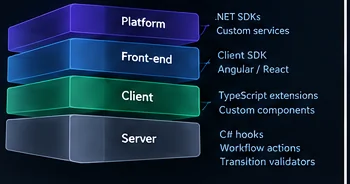
Server
Business rules on every data operation
- C# validation hooks
- Pre and post hooks
- Workflow actions
- Transition validators
Client
Behaviour on platform screens
- TypeScript screen extensions
- Custom components
- Screen and tenant CSS
Front end
Your own branded application
- TypeScript client SDK
- Angular components
- React hooks
Platform
New services on the same foundation
- .NET SDKs
- Custom services
- REST and OpenAPI
1. Server-side C#
Data hooks run around every create, read, update, delete and bulk operation on an entity: validate to refuse a save, pre-execute to change it, post-execute to react. Transition validators decide lifecycle moves. Custom workflow actions add new steps to workflows.
IValidationHook.ValidateAsync(HookContext)IPreExecutionHook.PreExecuteAsync(HookContext)IPostExecutionHook.PostExecuteAsync(HookContext)IWorkflowAction.ExecuteAsync(ActionContext)
using TAF.Infra.QueryHook.Interfaces;
using TAF.Infra.QueryHook.Models;

public class DiscountRule : IValidationHook
{
    public Task ValidateAsync(HookContext context)
    {
        if (context.Fields.TryGetValue("DiscountPercent", out var value)
            && Convert.ToDecimal(value) > 20)
            context.Errors.Add("Discounts above 20% need approval.");
        return Task.CompletedTask;
    }
}
2. Client-side TypeScript
Screen extensions add behaviour to platform screens through lifecycle hooks such as afterFormLoad, onChange and onBeforeSubmit, calling the platform through TabSdk. Custom components add your own controls to the screen designer. Both are compiled in the browser, with no platform release.
export class VendorScreenExtension extends IScreenExtensionBaseClass {
  onAfterSubmit(screenParameters: any) {
    TabSdk.ui.showSuccess('Vendor saved');
  }
}
3. Custom front end
Use TechAppForce headless: build your own Angular application on the TypeScript client SDK, with its unstyled components, or use its React hooks. The platform still provides data, access rules, lifecycles, approvals and files.
Client SDKHeadless architecture
- Your front endAngular or React, your brand
- Client SDKauth, data, workflow, realtime
- TechAppForce servicesthe same APIs and rules as the runtime
4. Platform services
Build a new service on the same foundation: the .NET SDKs for every platform service, the shared messaging and result types, and the clean-architecture template the platform's own services follow.
.NET SDKsShared infrastructure
- Service clients for data, metadata, reports, files and notifications
- Messaging over RabbitMQ with retries
- A common result envelope
How custom code runs
Custom C# runs inside the platform's services with your application's permissions, compiled on first use and cached. A static check refuses scripts that use file-system, process or socket APIs, but it is a guard rail, not isolation. Browser extensions run in the user's session. Treat both as production code your team reviews, tests and owns.
Check C# with TAF Studio's Check Script before publishing, keep hooks small, and review them like any other code you ship.
Build the application. Keep the code.
See how TechAppForce combines metadata-driven development, a professional IDE and governed AI-assisted building. When you are ready to build, open TechAppForce at techappforce.io.